Free Website Migration, Done for You by Our Team
Unwelcome renewal increase or slow support at your current host? Contact our customer support team and we will copy your website files, databases and email accounts to Baddas Cloud ourselves for free. You check a preview link first, and your old site stays online until you switch.
- Rs 0 migration fee on every plan
- Done by our support team for you
- Preview link before you switch DNS
- Your old site stays live during the move
- Files, MySQL databases and email included
- 24/7 customer support
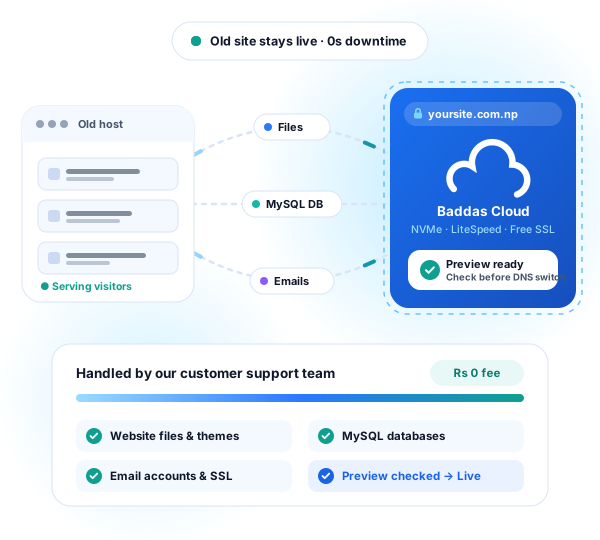
Rs 0 migration fee on every plan. Your old site stays live until you approve the preview.
What is free website migration?
Website migration means copying your website files, databases and email accounts from your old hosting provider to a new one. At Baddas Cloud, our customer support team migrates your website ourselves at no cost, sends you a preview link to test first, and helps you switch your domain with no downtime.
- Migration cost
- Rs 0 — included with every web hosting, WordPress and VPS plan
- Who moves the site
- Our customer support team does the entire migration for you
- Downtime
- None — your old host keeps serving visitors until you point your domain
- How to request it
- Contact us on WhatsApp, open a support ticket or email us
We migrate your website ourselves. You just contact us.
You never have to export MySQL tables, zip folders over FTP or debug broken paths on your own. Our customer support team is always happy to assist whenever you need us: tell us you want to move, and a real person on our team handles the transfer from start to finish for free.
Always happy to help, before and after the move
Not sure which plan fits your current site, or worried about your business email? Message us first. Support is 24/7 and a real person replies.
We do the technical work by hand
Our team logs into your old hosting panel, copies your files, databases and mailboxes to Baddas Cloud, fixes file paths and checks that your pages and SSL work.
You stay in control of the switch
We never flip your live domain without your say-so. We send you a preview link on our server, and you tell us when to point your nameservers.
Chat on WhatsApp
Fastest reply24/7 support · +977 9851362305
Send us your domain name and tell us who hosts your site today. We will check your site, suggest the right plan and start your migration.
Open a support ticket
Best for login detailsPrivate ticket in the Client Area
Already ordered a plan? Open a migration ticket in your Client Area to share your old cPanel or WordPress credentials securely with our team.
Email or call our team
Direct contactinfo@baddascloud.com · +977 9851362305
Prefer email or a phone conversation? Write to us with your website address and any questions, and our support team will walk you through the move.
How free migration works, step by step
Four clear steps from your first message to going live on Baddas Cloud, with your existing website online the entire time.
Contact us and pick your hosting plan
Message us on WhatsApp or order a hosting plan (from Rs 1,799/yr). Keep your old hosting account active for now so your current site stays online.
Share your old host access in a private ticket
Through our secure support ticket, share your current cPanel login, WordPress administrator login or backup files. We never ask for passwords in a public chat.
Our team copies your files, databases and email
We copy your website files, MySQL databases, themes, plugins and email accounts to your new Baddas Cloud plan while visitors continue using your old server.
Test the preview link, then point your domain
We send you a preview link so you can click through your pages, forms and checkout. Once you confirm everything looks right, we help you update your domain nameservers and issue free SSL.
Illustration: files, databases, email and SSL move from your old host to Baddas Cloud, then your site is ready to preview.
What our support team needs from you
When you contact us to start your free migration, having these details ready lets our team move your website in one smooth pass.
Your domain name and where it is registered
For example yourbusiness.com or yourcompany.com.np, and whether the domain is registered with the Nepal .np registry, your old host or another registrar.
Login to your current hosting panel (or WordPress admin)
If your current host uses cPanel, a full account copy moves your files, databases and email together. If you only have WordPress admin access, we can migrate your WordPress site directly from there.
A quick list of email addresses you use
Let us know if you use addresses like info@yourdomain.com on your current host, or if your email runs on Google Workspace or Microsoft 365 so we preserve those MX records.
Keep passwords out of public chats. Say hello on WhatsApp first; when it is time to share your old control panel login, our team gives you a private ticket link in the Client Area.
What is included in free migration, and what is not
We state the boundaries up front so you know what to expect before you contact us.
Included for free
- Full cPanel-to-cPanel account migrations (files, databases, email, subdomains)
- WordPress and WooCommerce websites (themes, plugins, media uploads and database)
- Custom PHP, HTML and MySQL websites
- Email accounts and stored messages from cPanel/IMAP webmail
- Preserving existing DNS records (such as Google Workspace or Microsoft 365 email)
- A private preview check and free SSL setup on Baddas Cloud
Outside standard free migration
- Closed website builders that do not allow code export (such as Wix, Squarespace or Shopify templates)
- Redesigning pages, rewriting website code or fixing bugs that already existed on the old host
- Paying off unpaid invoices or contract lock-ins at your previous hosting company
- Transferring a domain registration fee (moving hosting is free; a paid .com/.net registrar transfer renews the domain for a year)
Not sure if your website setup can be migrated? Contact our support team with your domain name and we will check it for you before you buy.
How long does website migration take?
Most websites are copied the same day our team receives your working login details. Below are typical time ranges so you can plan around your business hours.
| What we are moving | Typical copy time | What to know |
|---|---|---|
| WordPress blog, portfolio or company website | Usually 1 to 4 hours | Includes wp-content files, themes, plugins and MySQL database. |
| Full cPanel account (website + email mailboxes) | Usually 2 to 6 hours | Depends on total mailbox and media library size. |
| WooCommerce online store | Usually 2 to 6 hours | We recommend switching DNS during a quiet hour so no new orders land on the old host during the final sync. |
| Multiple websites or agency accounts | Same day to 24 hours | We move sites in the order you prioritize and let you check each one. |
| DNS propagation after switching nameservers | A few minutes to 24 hours | Both old and new servers show the same site during this window, so visitors never see an error page. |
What to check on your preview link before switching
We verify your pages after copying, and we also give you a preview link so you can check these six things before pointing your domain.
Home page, menus and internal links
Open the preview link we send you and click through your main pages, images and navigation menus to verify everything loads cleanly.
Contact forms and WooCommerce checkout
Send a test message through your contact form, or test adding a product to the cart if you run an online shop.
WordPress or admin dashboard login
Log into wp-admin or your application backend on the new server to confirm your posts, orders and plugins are all in place.
Business email accounts and MX records
Confirm your mailboxes are ready, or check that your Google Workspace / Microsoft 365 DNS records are copied across.
Free SSL padlock after DNS switch
As soon as your domain points to Baddas Cloud, we issue your free SSL certificate so https:// and the browser padlock are active.
Wait 48 hours before cancelling your old host
Keep your old hosting account open for a day or two after switching nameservers while every internet provider in Nepal updates its DNS cache.
Website migration questions, answered
Straight answers about downtime, emails, WordPress, domains and how our support team moves your site.
Is website migration to Baddas Cloud really free?
Yes. We do not charge a migration fee on any web hosting, WordPress hosting or VPS plan. You only pay for the hosting plan you choose, and our customer support team handles the move for you.
Do I have to migrate the website myself, or does your support team do it?
Our customer support team does it for you. You simply contact us on WhatsApp, ticket or email, share your old host login through our private ticket system, and we copy your files, databases and email accounts ourselves.
Will my website go offline while you move it?
No. While we copy your files and databases to Baddas Cloud, your domain still points to your old host, so visitors see your live website as normal. Only after you check the preview on our server and point your domain nameservers does traffic move to Baddas Cloud.
Will I lose my business emails when I switch hosts?
No. If your email is hosted on cPanel at your old provider, we copy your email accounts and existing inbox messages across. If you use Google Workspace, Microsoft 365 or Zoho Mail, we copy the exact MX, SPF and DKIM DNS records so your email continues without interruption.
Can you migrate my WordPress or WooCommerce site?
Yes. WordPress and WooCommerce are the most common sites we move. We copy all your themes, plugins, media uploads and MySQL tables, and configure LiteSpeed Cache once your site is on Baddas Cloud.
What if I do not have cPanel access at my old host?
Tell us what access you do have. For a WordPress site, an administrator login is enough for our team to migrate your site. For other websites, FTP/SFTP access plus a database export or backup archive works too.
Do I have to transfer my domain name to Baddas Cloud to migrate my hosting?
No. You can keep your domain registered wherever it is (including the free .com.np registry) and simply point its nameservers to Baddas Cloud. If you also want to move your .com, .net or .org domain registration to us, we can help with that separately.
How many websites will you migrate for me?
Every web hosting and WordPress plan supports unlimited websites. If you have several websites on your old cPanel account, tell our support team when you contact us and we will help you move them across.
What if my website is currently broken or hacked at my old host?
Tell us on WhatsApp before you order. Our support team will take a look first and tell you honestly whether we can restore a clean backup or move the working parts safely.
When should I cancel my old hosting provider?
Wait until your site is live on Baddas Cloud, you have checked the preview, your domain nameservers have been updated, and 24 to 48 hours have passed for DNS propagation. Once traffic is coming to Baddas Cloud, you can safely cancel the old host.
Ready for us to move your website?
Contact our customer support team on WhatsApp with your domain name, or pick a hosting plan and open a migration ticket. We handle the rest for free.